Read this first
Executive summary
3 operating principles- 01
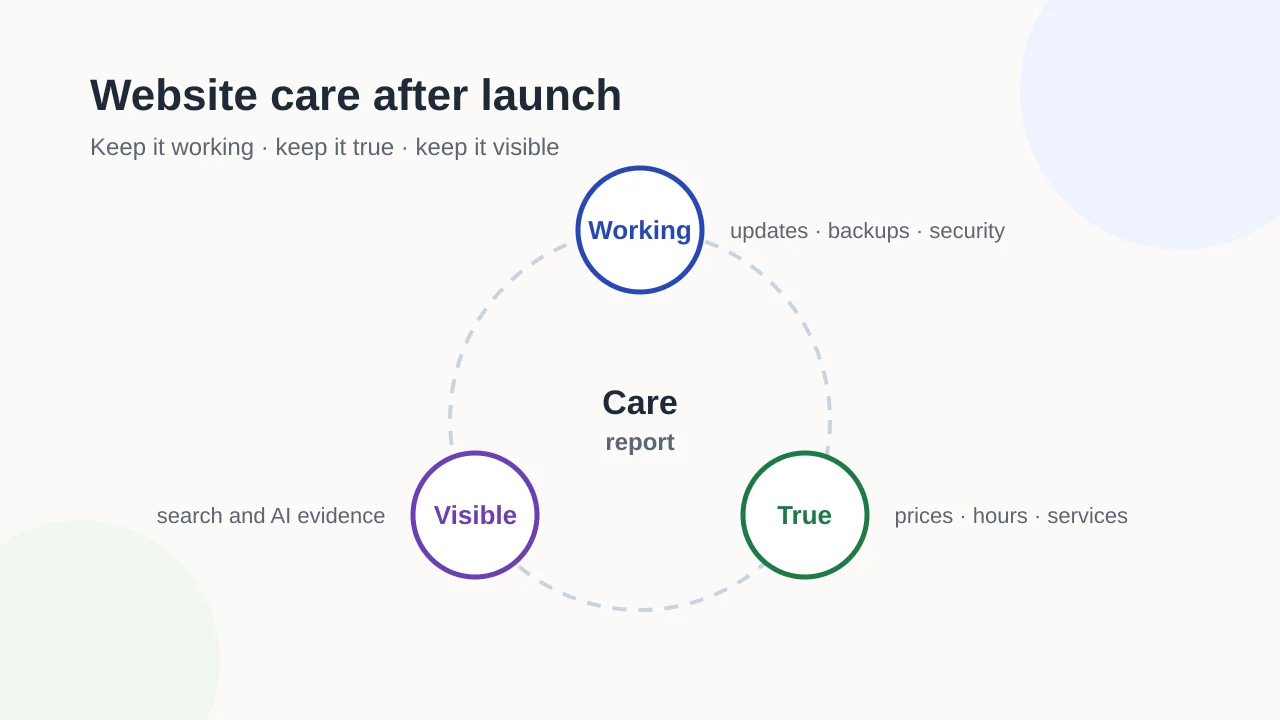
Care starts when launch triage is closed: it is the recurring work that keeps a live site working, true and visible.
- 02
Test that backups restore, review who has access and check business facts on a schedule, not only when something breaks.
- 03
Agree in writing who does what, and ask for a short report that separates work done, observations and decisions needed.
Article tools
Read, review or take this article into your preferred AI assistant.Summarize with AI
Copies a prompt with this article’s canonical URL. Review the result and verify its sources.Clipboard unavailable · copy prompt manually
A website does not stay finished. Software ages, certificates and domains expire, prices and opening hours change, and pages that once worked can quietly break. Website care is the recurring work that prevents this. It is easier to plan than to repair.
This guide covers what a care plan should include, how often each task usually happens and how to split the work between your business and whoever helps you, whether that is a provider or your own team.
When the launch window closes: from launch triage to routine care
The first weeks after a launch are about triage: checking redirects, fixing broken journeys and comparing the new site with the old one. The website launch checklist covers that window.
Care starts once that triage table is cleared. From then on, the work is scheduled rather than reactive. If you are still deciding what your site should contain, start with planning a business website instead; care assumes the site exists.
A simple way to organize care is three layers:
- Keep it working: software, backups, security, uptime.
- Keep it true: the facts on the site still match the business.
- Keep it visible: evidence that search engines and other systems can find and read it.
Keep it working: updates, backups, security and uptime
Software updates
Most websites run on a platform or content management system with plugins, themes or dependencies. Updates fix security problems and bugs, but can also break features. Good practice is to test updates on a copy of the site first, or at least to take a backup immediately before updating and check the key pages afterwards.
Backups that actually restore
A backup only counts if you can restore it. A care plan should state:
- what is backed up: files, database, uploads;
- how often, and how long copies are kept;
- where copies are stored, with at least one copy away from the live server;
- when a restore was last tested, and by whom.
The UK National Cyber Security Centre’s guide for small organizations explains that a backup lets you restore a copy of your data, including your website, if you lose access to it, for example after a ransomware attack or a failed device. Whatever country you are in, a restore test is the only way to know a backup works. Backups may contain personal data, so check how long you are allowed to keep them under the rules that apply to you.
Security and access
- Certificates. The certificate behind the padlock expires. Let’s Encrypt, a widely used certificate authority, currently issues certificates valid for 90 days by default and has announced shorter lifetimes, which is why automatic renewal matters. Check that renewal is automated and that someone is alerted if it fails.
- Domain renewal. Note the expiry date, turn on auto-renew with your registrar and keep the registrant contact details current. An expired domain takes the website and often the email with it.
- Access review. List who has logins to the site, hosting, domain and analytics. Remove people who have left and use multi-factor authentication where it is offered.
- Forms. Check that spam protection works and that real messages still arrive.
Uptime and performance
Availability monitoring tells you when the site is down before customers do. For speed, Google’s web.dev explains Core Web Vitals such as Largest Contentful Paint and Interaction to Next Paint. Treat them as evidence about user experience, observed over time, not as a score that guarantees anything.
How often: a frequency table
These intervals are examples for a typical small business site. Adjust them to how often your site changes and how much depends on it.
| Task | Weekly | Monthly | Quarterly | Yearly |
|---|---|---|---|---|
| Check forms and key pages work | ✓ | |||
| Confirm backups ran | ✓ | |||
| Apply and test software updates | ✓ | |||
| Review uptime and error alerts | ✓ | |||
| Review search evidence | ✓ | |||
| Test a full restore from backup | ✓ | |||
| Review user accounts and access | ✓ | |||
| Review business facts and prices | ✓ | |||
| Accessibility spot check of new content | ✓ | |||
| Check domain and certificate renewal settings | ✓ | |||
| Review legal pages and cookie consent | ✓ |
Keep it true: content and business-fact reviews
A site can be technically perfect and still mislead customers. Put these on a schedule:
- Prices and offers: remove expired promotions and update price ranges.
- Opening hours: including holidays and seasonal changes.
- Services: add new ones, remove discontinued ones and redirect their pages sensibly.
- People: staff who have left, new contacts and updated photos.
- Legal pages: privacy notice, terms and cookie information.
Give each fact an owner and a review date. The same facts usually appear in your Business Profile and directory listings, so update them together and periodically keep listings consistent with an audit.
Keep it visible: search and AI visibility evidence
Visibility monitoring is about evidence, not promises:
- Search Console. Google’s Page indexing report shows which pages Google has indexed and reasons why others are not. The guide on how to read indexing evidence explains how to interpret it without over-reading single changes.
- Broken and orphaned pages. Check for internal links to pages that no longer exist, and pages that nothing links to. The internal linking guide shows how to find orphaned pages.
- AI assistants. If you track how AI tools describe your business, use dated samples and compare them over time. The guide to an AI search visibility baseline sets out a method.
Record what you observed, when, and from which source. A single drop in a chart is a reason to look, not proof of a problem.
Accessibility as an ongoing task
Accessibility is not a one-off launch check. Every new page, image or document can add a problem: images without alternative text, skipped heading levels or text with poor color contrast. The W3C’s Easy Checks are a practical way for non-specialists to spot common issues. Include a quick check whenever substantial new content is published.
Who does what: a responsibility matrix
Care fails most often in the gaps between people. Agree the split in writing, whether you work with a provider or keep everything in-house:
| Task | Business | Provider or in-house technical help | Notes |
|---|---|---|---|
| Software updates and testing | |||
| Backups and restore tests | Where copies are stored | ||
| Certificate and domain renewal | Registrar account owner | ||
| Access reviews | |||
| Uptime monitoring and response | Expected response time | ||
| Business facts and prices | Usually the business | ||
| New pages and content changes | |||
| Search and visibility review | |||
| Accessibility checks | |||
| Care report | How often, and to whom |
Also note what care is not: redesigns, new features and migrations are usually separate projects. Writing that down avoids disappointment on both sides.
What a care report should show
A useful care report is short and has three parts:
- Done: updates applied, backups confirmed, restore test result, renewals checked.
- Observed: errors, downtime, changes in search evidence, outdated content found, each with a date and source.
- Needs a decision: anything that requires the business to choose, approve or pay for.
If a report only lists completed tasks, you cannot see risks building up. If it only lists problems, you cannot tell whether the routine work happened.
Choosing a provider or doing it yourself
Whichever route you take, settle these questions in writing:
- Which of the tasks above are included, and how often?
- Who owns the accounts: domain, hosting, analytics and the site itself?
- How quickly are problems acknowledged and fixed, and what counts as urgent?
- How are backups stored, and when were they last restored?
- What does the report contain, and how often will you receive it?
- What happens to your site, data and accounts if the arrangement ends?
Exendia’s website design and development page notes that hosting, maintenance and support can be scoped around your website and needs. If your site is live but hard to find, the AI search visibility service and on-page SEO service are relevant next steps.
Evidence layer
References and further reading
Primary documentation used to review the technical concepts in this guide.- National Cyber Security Centre (UK)Backing up your data
- Let's EncryptLet's Encrypt FAQ
- Search Console HelpPage indexing report
- web.devWeb Vitals
- W3C Web Accessibility InitiativeEasy Checks: A first review of web accessibility